
Vaultwarden is a great solution to self-host your passwords, it’s compatible withe the Bitwarden client but what if you could get directly your passwords available in the search bar in gnome ?
Thanks to https://github.com/jle64/gnome-pass-search-provider/ and https://github.com/doy/rbw you can easily implement it.
Install the required tools
1# apt install python3-fuzzywuzzy pass wl-clipboard git
2# git clone https://github.com/jle64/gnome-pass-search-provider.git
3# cd gnome-pass-search-provider
4# bash ./install.sh
The rbw tool can be downloaded for debian based distributions here
Configure rbw access to you bitwarden instance
1$ rbw config set email [email protected]
2$ rbw config set base_url https://vault.example.com
3$ rbw list
4--> Type your password
You can modify other settings if you need to such as lock_timeout or sync_interval.
You can view the available options using rbw config show
Configure
Open a terminal and run
1systemctl --user edit org.gnome.Pass.SearchProvider.service
Add the following, save and exit (Ctrl-O , Ctrl-X)
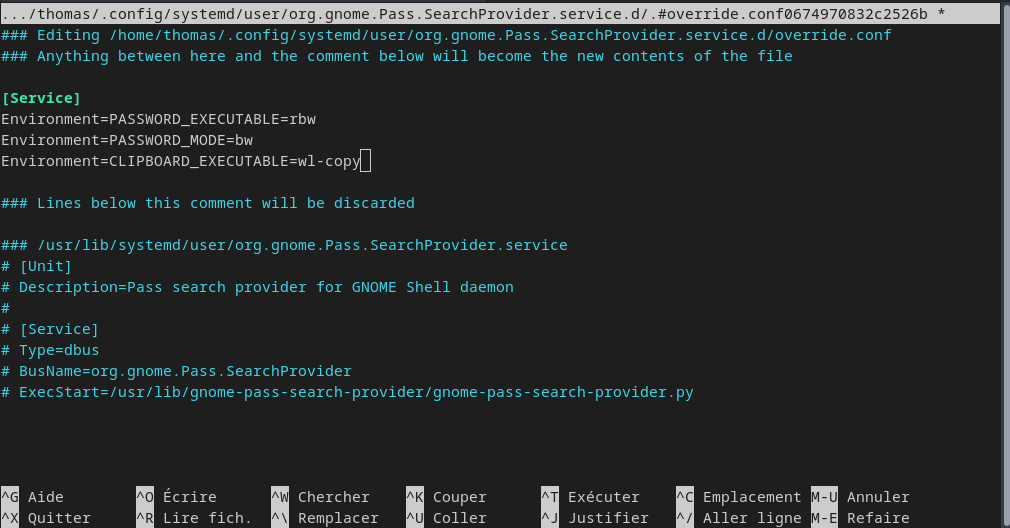
Then save and restart the service with
1systemctl --user restart org.gnome.Pass.SearchProvider.service`
You will need to close your session and login again to make it work correctly
You might also like
 linux
linuxBackup using restic, runrestic and Minio
A way to backup your servers using a s3 bucket
 linux
linuxUbuntu, TPM2 and disk encryption
Use the tpm2 chip to decrypt your disk at startup without entering your passphrase.