
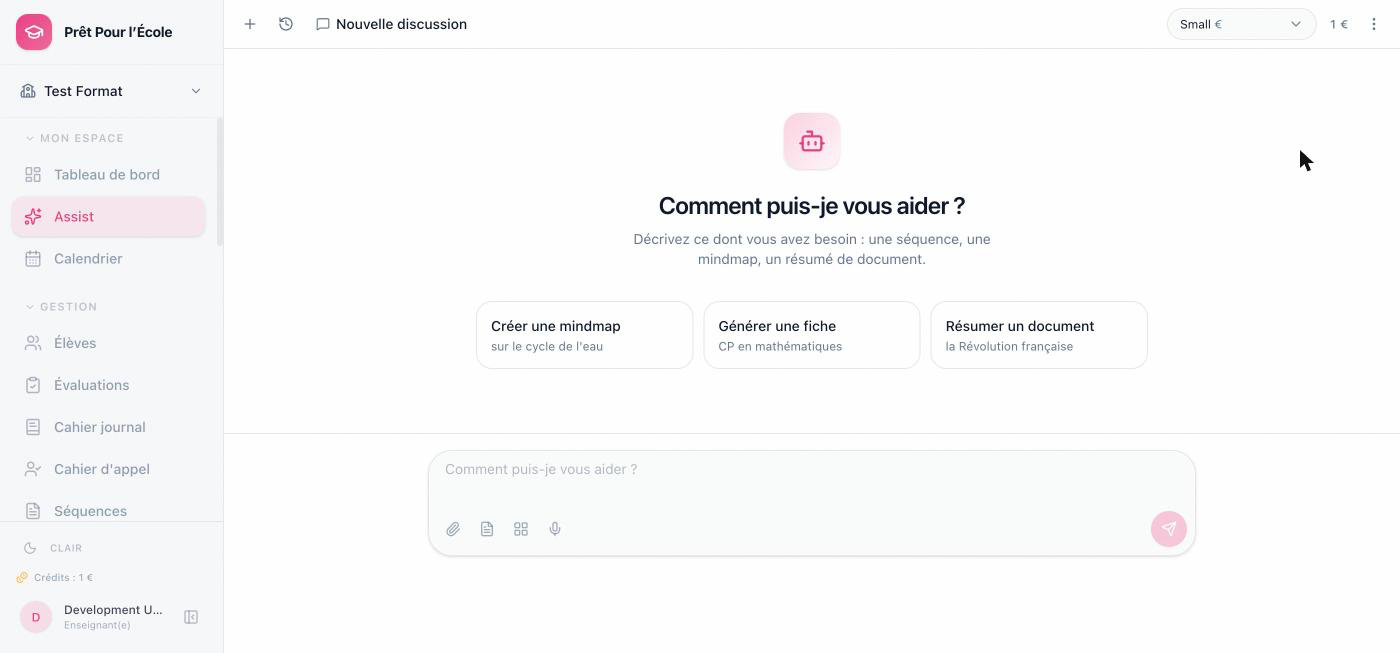
How I embedded OpenCode as a headless agent server to power “Assist”, the AI chat feature of my side project for kindergarten teachers.
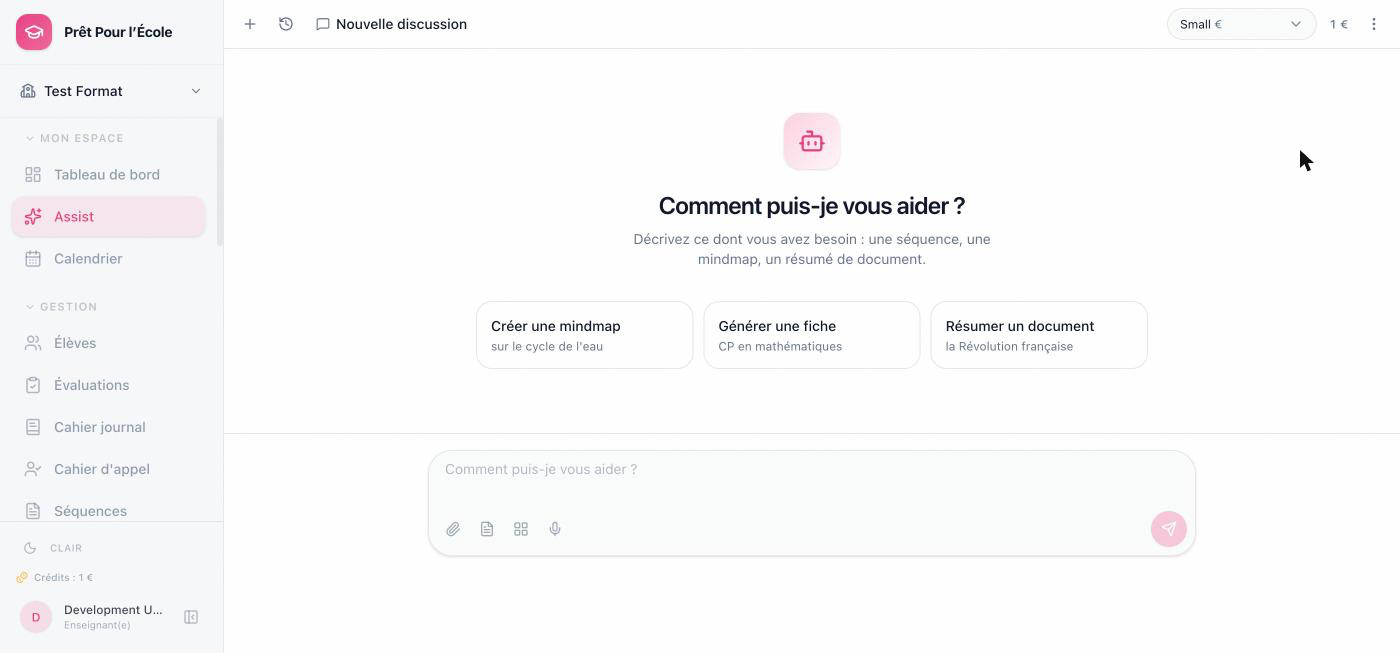
I’ve been building Prêt Pour l’École (PPE) on the side, a web app that helps French kindergarten/primary teachers (PS/MS) plan lessons, track students, take attendance, and generally survive the admin load of teaching. One of the core features is Assist, a chat assistant that can draft a lesson sequence, generate a mindmap, summarize a document, or just answer a pedagogical question, grounded in the teacher’s actual classes, students and timetable.
I could have wired a chat endpoint straight to an LLM API and called it a day. Instead I put OpenCode behind it as a standalone agent server. This post is about why, and how it’s actually wired up.
Note
Full credit where it’s due: the idea of embedding OpenCode as a headless agent backend instead of building an agent loop from scratch comes from this article on trythis.app. I read it, thought “wait, that solves my exact problem”, and PPE’s Assist backend is the result. Go read the original, it covers the SDK/plugin side of things in more depth than I do here.
What OpenCode actually is here
OpenCode is normally sold as a terminal coding agent — the CLI you run in a repo to have it read files, run commands, and edit code. What’s less obvious from the marketing is that opencode serve is just an HTTP server exposing sessions, messages, and a real-time event stream. Nothing about that server cares whether the agent is coding or not. Point it at a workspace with no code tools enabled, hand it a domain-specific AGENTS.md, and it becomes a generic conversational agent with tool-calling, session management, and streaming already built.
That’s the whole trick: I’m not using OpenCode to write code. I’m using its server as a free agent runtime — sessions, SSE, provider routing, tool orchestration — for a pedagogical assistant that has nothing to do with software.
Architecture
opencode-service is its own pod in the cluster, completely separate from the main backend. The Express backend talks to it over plain HTTP (create a session, send a message, subscribe to /event), and — this is the part I like — OpenCode talks back to the backend over MCP to actually do things: read a class roster, fetch a timetable, search the teacher’s uploaded documents, create a calendar event. The agent server never touches the database directly. It only knows how to have a conversation and call tools; the backend is still the only thing with real authority over the data.
The workspace: opencode.json and AGENTS.md
Everything OpenCode needs to become “Assist” lives in a workspace directory that gets baked into the service’s Docker image:
1FROM node:20-slim
2WORKDIR /app
3RUN --mount=type=cache,target=/root/.npm npm install -g opencode-ai
4COPY workspace/ /workspace/
5WORKDIR /workspace
6EXPOSE 4096
7CMD ["sh", "-c", "... inject secrets into opencode.json ... && opencode serve --port 4096 --hostname 0.0.0.0"]
opencode.json is where I turned off everything that makes OpenCode a coding agent:
 1{
 2  "model": "mistral/mistral-small-latest",
 3  "provider": {
 4    "mistral": {
 5      "npm": "@ai-sdk/openai-compatible",
 6      "options": { "baseURL": "https://litellm.internal/v1" },
 7      "models": {
 8        "mistral/mistral-small-latest": { "name": "Mistral Small", "description": "Rapide et économique" },
 9        "mistral/mistral-medium-latest": { "name": "Mistral Medium", "description": "Équilibre performance et coût" },
10        "mistral/mistral-large-latest": { "name": "Mistral Large", "description": "Raisonnement complexe" }
11      }
12    }
13  },
14  "tools": {
15    "file_read": false,
16    "file_write": false,
17    "file_edit": false,
18    "bash": false,
19    "glob": false,
20    "grep": false,
21    "lsp": false
22  },
23  "permission": "allow",
24  "mcp": {
25    "ppe-tools": { "type": "remote", "url": "__PPE_BACKEND_MCP_URL__", "headers": { "X-Backend-Shared-Secret": "__ASSIST_TOOL_SECRET__" } }
26  }
27}
No filesystem access, no shell, no LSP. The only tools it has are the ones I explicitly gave it through a remote MCP server pointed back at my own backend (more on that below). provider points at LiteLLM as an OpenAI-compatible endpoint, so swapping Mistral for something else later is a config change, not a rewrite.
The top-level model is only the fallback. Each request picks the actual model from the teacher’s own preference, stored in the database and passed down to sendMessage/streamMessage:
1const model = userModel?.preferred_model || 'mistral-small-latest';
So a teacher who wants better reasoning for a tricky lesson plan can switch to Mistral Large from the UI, tool-calling included — Small is just what you get by default until you touch that setting.
AGENTS.md is the system prompt, basically:
 1# Assist — Assistant Pédagogique Intelligent
 2
 3## Rôle
 4Tu es "Assist", un assistant pédagogique expert en éducation maternelle et
 5primaire (cycles 1-3, école française). Tu aides les enseignants à préparer
 6leurs cours, créer des séquences pédagogiques, et améliorer leurs contenus.
 7
 8## Règles
 9- Toujours répondre en français
10- Utiliser les skills quand l'utilisateur demande explicitement une action spécifique
11- Pour les mindmaps, réponds UNIQUEMENT avec un objet JSON tree...
This is the file that actually defines the product’s personality and output contracts (strict JSON for mindmaps, a specific schema for lesson sequences). Changing what Assist is is a markdown edit, not a deploy of new agent logic.
Skills: reusable playbooks instead of one giant prompt
Rather than cramming every capability into AGENTS.md, each one lives in its own skill under .opencode/skills/:
1.opencode/skills/
2├── improve/       corrige un texte pédagogique
3├── lesson-plan/   génère une fiche de séquence structurée
4├── mindmap/       génère une mindmap au format JSON tree
5├── summary/       résume un contenu pédagogique
6└── translate/     traduit entre le français et une autre langue
Each SKILL.md is a small, self-contained spec — name, description, usage pattern, expected output format:
 1---
 2name: lesson-plan
 3description: Générer une fiche de séquence pédagogique structurée
 4---
 5## Utilisation
 6/séquence <sujet> [niveau] [durée]
 7
 8## Format de sortie
 9- Titre de la séquence
10- Domaine d'apprentissage
11- Objectifs pédagogiques
12- Déroulement (blocs de 30-45 min...)
13- Évaluation
The backend activates the relevant skill instructions per-message based on what the user is doing in the UI, instead of the model having to infer intent from one enormous prompt every single time. Adding a new capability to Assist is: write a SKILL.md, maybe add a matching MCP tool, done.
Giving the agent real tools, safely
This is the part that took the most thought. The agent needs to act on real teacher data — list a class, check a timetable, create a calendar event — but it’s running in a completely separate pod with no idea who’s actually talking to it. I didn’t want to trust anything the model says about “which user this is” (models will absolutely make up a user ID if you let them).
So the backend exposes an internal MCP server (/api/internal/mcp), built on the SDK’s Streamable HTTP transport rather than the older HTTP+SSE one:
1import { StreamableHTTPServerTransport } from '@modelcontextprotocol/sdk/server/streamableHttp.js';
Worth flagging since it sits right next to the SSE stream described below and it’s easy to conflate the two: OpenCode’s own /event endpoint is SSE because that’s what opencode serve exposes — not something I get to choose, I just consume it. The MCP server, on the other hand, is code I own, and Streamable HTTP is the transport the MCP spec has favored since it replaced HTTP+SSE in the 2025-03-26 revision — so that’s the one I picked.
Every message the user sends carries a short-lived, HMAC-signed token binding the conversation to the real logged-in user:
1export function signToolToken(userId: number, conversationId: string, ttlSeconds = 1800): string {
2  const expiresAt = Date.now() + ttlSeconds * 1000;
3  const payload = JSON.stringify({ userId, conversationId, expiresAt });
4  const payloadB64 = b64url(payload);
5  const sig = createHmac('sha256', ASSIST_TOOL_SECRET).update(payloadB64).digest();
6  return `${payloadB64}.${b64url(sig)}`;
7}
That token gets injected straight into the system prompt for the message, along with an explicit instruction to pass it along verbatim:
1[OUTILS PPE]
2Tu as accès à des outils pour consulter et agir sur PPE (classes, élèves,
3emploi du temps, calendrier...). [...]
4Tous ces outils, SAUF search_web, exigent le paramètre "session_token".
5Passe TOUJOURS exactement cette valeur, sans la modifier ni l'inventer : ${toolToken}
Every user-scoped tool call verifies that token first and resolves the real userId from it — the model can hallucinate all it wants, it can’t forge a valid signature:
1function requireUser(sessionToken: string): { userId: number } | { error: ToolResult } {
2  const verified = verifyToolToken(sessionToken);
3  if (!verified) {
4    return { error: errorResult('session_token invalide ou expiré...') };
5  }
6  return { userId: verified.userId };
7}
There are two separate trust boundaries stacked here, and I think that separation matters: a shared secret (X-Backend-Shared-Secret) proves this MCP request came from our own OpenCode instance and nothing else; the per-conversation token proves this specific tool call is on behalf of this specific teacher. Losing the shared secret doesn’t let anyone impersonate a user, and a leaked tool token expires in 30 minutes and is scoped to one conversation.
With that in place, the agent gets 14 real tools registered on an MCP server:
1search_web            list_classes           get_calendar_events
2create_lesson_plan    get_class_detail       create_calendar_event
3create_mindmap        list_students           list_lesson_plans
4search_documents      get_timetable          create_presentation
5get_student_report    get_class_report
Most of them are read-only lookups gated by checkClassAccess() (a teacher can’t query another teacher’s class). The interesting half is the other one.
One agent, every document a teacher needs
This is really the point of the whole setup: Assist isn’t a chatbot bolted onto PPE that happens to answer questions about teaching — it’s the thing that actually produces the documents a teacher would otherwise build by hand in five different screens. Ask for a lesson sequence, a mindmap on the water cycle, a set of presentation slides, or a calendar entry for a field trip, and the same conversation calls create_lesson_plan, create_mindmap, create_presentation or create_calendar_event — each one returns structuredContent, not prose:
 1server.registerTool(
 2  'create_mindmap',
 3  {
 4    description: 'Produit une carte mentale structurée (arbre). N\'écrit rien en base : '
 5      + 'le résultat est affiché directement dans la conversation.',
 6    inputSchema: mindmapSchema.shape,
 7    outputSchema: mindmapSchema.shape,
 8  },
 9  async (input) => jsonResult(input),
10);
The backend only forwards structuredContent back to the frontend — no attempt to render it as text. The frontend knows the schema for each tool and renders the actual PPE widget: a mindmap tool call becomes a live Excalidraw canvas right in the chat, a lesson plan becomes the same structured card you’d see on the Séquences page, a calendar proposal shows up as a real event card the teacher can drop onto their calendar. Nobody’s asking the model to hand-roll rich UI, and nobody’s screen-scraping markdown to reconstruct structured data — it comes out structured because the tool’s outputSchema forced it to be.
And every one of them stops one step short of writing anything: create_lesson_plan, create_mindmap, create_calendar_event, create_presentation are all explicitly “N’écrit RIEN en base” in their own descriptions — they propose, the teacher reviews the rendered result and clicks confirm, and only then does a normal authenticated REST call (the same one the UI would make if the teacher had built it by hand) persist it. The agent gets to cover the entire surface of what a teacher produces in a week, without ever holding write authority over the database itself.
Streaming it back to the chat UI
The backend never polls for a response. It opens one persistent connection to OpenCode’s /event SSE stream and dispatches by session ID to whoever is currently listening:
1const res = await fetch(`${OPENCODE_URL}/event`, { headers: authHeaders(), signal });
2const reader = res.body?.getReader();
3// ...
4for (const line of lines) {
5  if (line.startsWith('data: ')) {
6    const event = JSON.parse(line.slice(6));
7    this.dispatch(event);
8  }
9}
message.part.updated events carry text deltas as the model streams its answer, session.status flips between busy/idle, session.error carries provider errors. Each of those gets forwarded to the Express response as its own SSE stream to the browser, so the teacher sees the answer type out live, exactly like the OpenCode CLI itself would show it — I just get to skip building any of that streaming plumbing myself.
Deploying it
opencode-service runs as its own Kubernetes Deployment, internal-only (no ingress), reachable from the backend by service name:
1env:
2  - name: LITELLM_URL
3    value: "https://litellm.internal"
4  - name: PPE_BACKEND_MCP_URL
5    value: "http://{{ include \"ppe.fullname\" . }}:{{ .Values.service.port }}/api/internal/mcp"
6  - name: ASSIST_TOOL_SECRET
7    valueFrom: { secretKeyRef: { name: opencode-secrets, key: assist-tool-secret } }
Same secret on both sides, injected at container start into opencode.json (the entrypoint script patches the API key and MCP URL/secret into the config file before opencode serve boots). Scaling it is just bumping replicaCount — sessions live in OpenCode’s own storage, not in the pod, so there’s nothing sticky about which replica handles which conversation beyond the runtime cache the backend keeps to avoid recreating a session on every message.
What this bought me
I didn’t write a single line of “agent loop” code — no manual tool-calling parser, no streaming reassembly logic, no provider abstraction. All of that is OpenCode’s job, and it’s a genuinely well-built job. What I did write is the part that’s actually specific to my product: what tools exist, what they’re allowed to touch, and how to prove who’s asking. That felt like the right place to spend the effort.
If you’re building something similar, go read the trythis.app article first — it’s what pointed me here in the first place, and it goes deeper on the plugin/SDK side that I didn’t need for this project.
You might also like
 ai
aiDeploy and configure Librechat on Kubernetes
In this article you will learn how to deploy Librechat on Kubernetes and how to configure cloud based LLM …